Choosing the best USB Power Strip in 2026 means looking beyond the number of ports. A strip beside a desk may need to charge a laptop, phone, and earbuds at once; a crowded kitchen counter has different needs. Check total output, per-port limits, spacing, cord length, and overload protection before comparing prices. Small details matter. A fast USB-C port can still share limited power with other ports.
USB-IF’s USB Power Delivery 3.1 specification supports power levels up to 240 watts, but that figure does not mean every USB-C power strip can deliver 240 watts. The strip, charger circuitry, cable, and connected device all affect charging performance. Jeff Ravencraft, USB-IF president, has discussed how the USB Power Delivery standard enables higher power through USB-C. The practical takeaway is simple: verify the product’s stated output, rather than judging it by the connector shape.
Safety deserves equal attention. Look for clear electrical ratings, recognized third-party safety certification, and instructions that match how you plan to use the strip. Avoid stacking strips or hiding one under a rug. Those habits are easy to overlook. This guide compares the specifications and everyday features that help distinguish a suitable USB Power Strip from one that only looks convenient. One caveat: advertised maximum output may not be available across every port at the same time, so read the fine print.
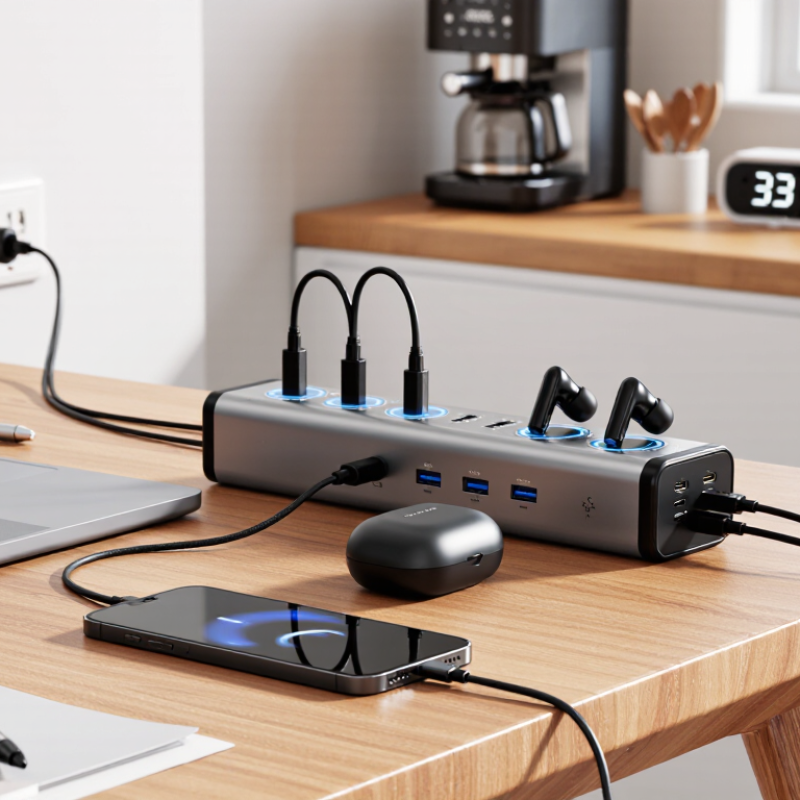
A USB power strip combines standard AC outlets with a built-in USB charging module. Inside, a switching power supply converts mains electricity into lower-voltage DC. A controller manages charging, while the ports, wiring, enclosure, and protective components complete the system. Surge protection and overload protection serve different purposes; one does not guarantee the other.
USB-IF’s USB Power Delivery 3.1 specification allows compatible equipment to negotiate power up to 240 watts. That is a protocol ceiling, not a promise that any strip or port can deliver it. Check each port’s output and the strip’s total USB power budget. Some models share power across ports, so two connected devices may charge more slowly. Small detail, big difference.
Tips: Match port output to your devices, then check the total shared wattage. Look for clear electrical ratings and independent safety certification. Feel the casing after several minutes of charging; unusual heat deserves attention. I would not choose by port count alone—it is an easy detail to overvalue.
Before choosing a USB power strip, list what you will charge at the same time. A laptop may request 65 watts, while a phone draws 20 watts and earbuds use much less. Check each device’s charger label or manual; the number printed on a charger is its maximum output, not always its everyday draw. Still, plan for the maximum when several devices may charge together. Small details matter.
Add the likely USB loads, then compare that figure with the strip’s stated total USB output. A strip with several ports may share power between them, so one laptop could charge more slowly when a tablet and phone are connected. Check whether USB-C Power Delivery is supported at the wattage your laptop needs, and read the per-port and combined-output limits. Also count anything using an AC outlet, such as a monitor or desk lamp, against the strip’s overall rating. Leave some room. In my own desk setup, estimating from device labels gave a safer plan than counting ports, though actual charging demand changes with battery level. If the numbers are unclear, consult the product specifications rather than assuming every port can deliver its listed maximum at once.
A USB power strip is only as useful as its charging ports and outlet layout. Count the devices you charge at the same time, not just the ports printed on the box. A USB-C port may support fast charging, while a USB-A port may deliver less power. Check the listed output for each port and the total USB power available when several devices are connected.
Charging standards matter. USB Power Delivery can charge compatible phones, tablets, and some laptops, but the device and cable must support the needed wattage. Some products divide power across ports, so a laptop may charge more slowly when a second device is plugged in. Read the output table carefully. A large number on the package can be easy to misread.
Check outlet capacity, too. The strip’s rating should suit the combined load of the appliances you plan to connect; never exceed its stated limit. Look for enough space between outlets for bulky adapters, and check whether surge protection is included if that matters for your setup. Small detail, big difference. One honest drawback: product labels can be confusing, and advertised peak output may not be available from every port at once. Compare the fine print with your actual charging routine.
When choosing a USB power strip, inspect its certification label, not just the packaging. In the United States, UL 1363 applies to relocatable power taps, while UL 1449 covers surge-protective devices. A USB port does not automatically mean the strip has surge protection. Look for certification from an independent testing organization and a clear model number you can verify.
The risk deserves attention. NFPA’s Home Electrical Fires report found that electrical distribution and lighting equipment was involved in an estimated 34,000 U.S. home structure fires annually from 2015 to 2019. That category is broad; it does not mean power strips caused those fires. Still, check for overload protection, a grounded plug, and a cord that feels substantial, with secure strain relief where it enters the housing.
Build details matter. Check that outlet contacts grip plugs firmly and that the casing has no gaps, sharp edges, or loose seams. For USB-C, compare the stated power output with your devices’ needs; several ports may share one limited output. Small print can be annoying. Read it anyway. I once treated a wide housing as proof of sturdiness; it was not. A heavy unit can still hide weak components, so rely on certification and clear electrical ratings, not weight alone.
| Evaluation Area | What to Check | Reliable Evidence or Practical Target | Why It Matters |
|---|---|---|---|
| Electrical safety listing | Check the product label and documentation for certification to the applicable standard for the product and market. | For U.S. relocatable power taps, UL 1363 is a relevant standard. Confirm the exact model in the certifier’s directory; a logo alone is not proof. | Independent testing helps verify that the product meets defined electrical and fire-safety requirements. |
| Surge protection | Determine whether surge protection is included or whether the strip is only an outlet extender. | If surge protection is claimed, look for a stated joule rating and certification to UL 1449 where applicable. Check for a protected/grounded indicator and guidance on replacement after protection is exhausted. | USB ports do not, by themselves, mean that the AC outlets have surge protection. |
| USB charging output | Review the output rating for each port and the maximum combined output when multiple ports are used. | Ratings should state voltage, current, and—where relevant—USB Power Delivery (PD) wattage. Treat the shared maximum as the limit for all USB ports together. | A high rating for one port may not be available when other ports are charging devices. |
| Total AC load | Read the maximum voltage, current, and wattage printed on the strip; add the loads connected to its outlets. | Use the product’s marked rating and follow local electrical rules. In the U.S., many household circuits are 15 A or 20 A; the circuit and strip limits both matter. | Exceeding a rating can cause overheating or trip an overcurrent device. Do not connect power strips in series. |
| Overload and thermal protection | Look for an integrated circuit breaker or other documented overload protection, plus clear reset or operating instructions. | Confirm the protection is described in the manual or product label; do not rely only on phrases such as “heavy duty” or “safe.” | Protection can help interrupt excessive current, but it does not make an overloaded setup safe to use. |
| Grounding and outlet design | Check that the plug and AC outlets match the intended country, and inspect the grounding pin or contact where the design requires one. | Look for secure-fitting outlets, intact insulation, and clear grounding information. Do not use a damaged plug or remove a grounding pin. | Proper grounding and sound outlet contacts are important for safe operation of compatible equipment. |
| USB-C and cable claims | Check whether USB-C ports support the charging protocol and power level your devices require. | Look for specific PD output profiles and any stated total-output limits. USB-C describes a connector; it does not guarantee a particular charging speed. | Clear ratings help avoid confusing connector type with charging capability. |
| Build quality | Inspect the enclosure, plug, cord entry, switch, and outlet fit for damage, looseness, sharp edges, or rattling parts. | Choose a unit with an intact, firmly assembled enclosure and a cord suited to its marked rating and intended placement. Follow any mounting and ventilation instructions. | Physical damage or poor strain relief can expose conductors or contribute to overheating. |
| Certification versus marketing | Distinguish electrical safety certification from regulatory or compatibility markings. | UL and ETL are examples of third-party certification marks when backed by a valid listing. FCC Part 15 concerns radio-frequency emissions; it is not an electrical safety certification. | Different marks address different requirements, so one marking should not be treated as proof of every safety feature. |
| Use and placement | Check the manual for indoor or outdoor use, mounting, clearance, and cord-routing limitations. | Use only in the stated environment; keep the strip dry and uncovered, and avoid pinching the cord under furniture or rugs. | Correct use reduces risks that product certification cannot prevent, such as moisture exposure or trapped heat. |
Ratings and certification requirements vary by model and country. Verify the exact product documentation and applicable local electrical requirements before purchase or use.
Start with the room, not the number of outlets. Measure the distance from the wall socket to your desk, bedside table, or media console. NFPA’s report Home Fires Involving Extension Cords estimates about 3,300 U.S. home fires involving extension cords each year from 2013 to 2017, with an annual average of 50 deaths and 270 injuries. Keep the strip accessible, and avoid placing it under rugs or behind heavy furniture.
For a desk, check whether the USB ports can charge your devices at the speeds they require. A laptop may need more USB-C power than a phone, and some strips share output across several ports. Read the total USB wattage and the per-port limits, not just the port count.
Small detail. Wide-spaced AC outlets also help bulky adapters fit without blocking neighboring sockets.
In a bedroom or shared workspace, consider cord length, switch placement, and whether you need surge protection. Match the strip’s rated capacity to the devices you plan to connect, and look for an independent safety certification. I’d leave one outlet free; it is easy to underestimate how quickly chargers and lamps accumulate. Check the product’s safety instructions before plugging in high-draw appliances.
It combines standard AC outlets with USB charging ports. Inside, a power supply converts mains electricity into lower-voltage DC.
Not necessarily. Ports may share power, so several connected devices can charge more slowly. I still overvalue port counts sometimes.
Check each device’s charger label or manual. Add likely USB loads, and plan for maximum output when devices may charge together. Leave some room.
No. It shows the charger’s maximum output, not necessarily the device’s usual draw.
No. Check for USB-C Power Delivery and confirm the port’s wattage meets your laptop’s needs. Shared output can affect charging speed.
It sets a protocol ceiling for compatible equipment. It does not mean a particular strip or port can deliver that amount.
Yes. Include items like a monitor or desk lamp when checking the strip’s overall rating.
Read the per-port and combined-output limits. Check for clear electrical ratings and independent safety certification. Unusual casing heat deserves attention.
No. They serve different purposes, and one does not guarantee the other.
Choosing the best USB Power Strip in 2026 starts with understanding how it works: it combines standard outlets with USB ports, while internal components manage and distribute power. Before comparing models, list the devices you plan to connect and estimate their combined power needs. This helps ensure the strip can support your everyday setup without being overloaded.
Compare the number and type of USB ports, charging standards, and available outlets to match your devices and future needs. Also check for useful safety features, recognized safety certifications, sturdy construction, and a power cord suited to your space. Consider where the strip will be used, how much room you have, and whether its layout makes plugs easy to access. The right choice balances capacity, charging convenience, safety, and practical fit for your home or workspace.